AI workflow automation gets talked about like they’re a switch you flip. Install a tool, connect it to your inbox, and suddenly your business runs itself. That version sells well but falls apart on contact with reality.
What works looks less dramatic. A quote follow-up that drafts itself overnight. A form submission that gets read, sorted, and routed before you open your laptop. A weekly client summary that pulls from three different sources and lands in your inbox at 7am Monday.
None of that requires a computer science degree. It does require someone (perhaps with a computer science degree) to set the thing up properly, test it, and adjust it when your business changes. That’s the part most AI vendors skip over. It’s what Dear John NZ focuses on, working with small businesses across the Wellington region and New Zealand.
What AI workflow automation is
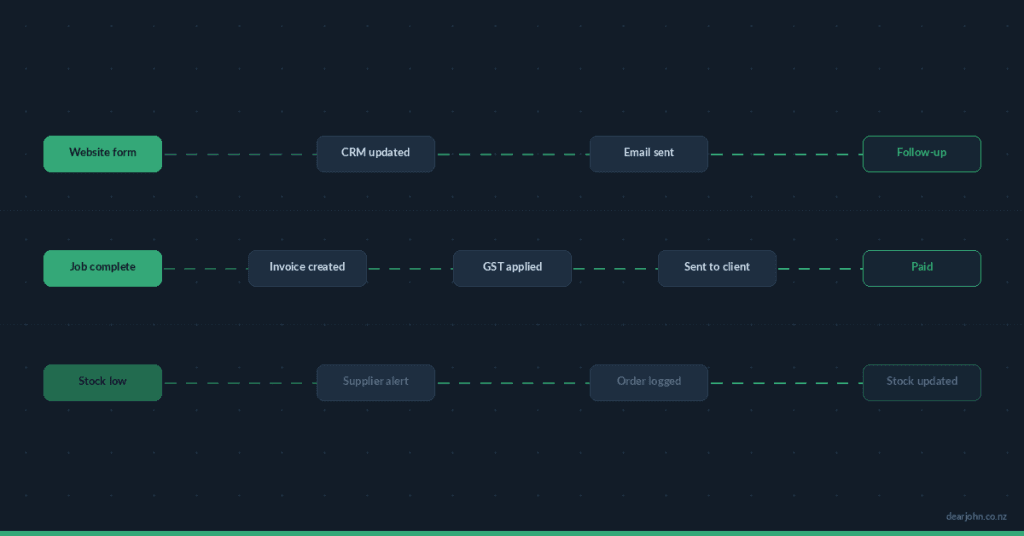
A workflow is a sequence of steps that happen in order: something triggers it, things get processed, an output arrives. You already have dozens of these in your business. Most of them run on you remembering to do them.
AI workflow automation replaces the parts where you’re doing repetitive thinking. Not the decisions that need your judgment — the processing, sorting, drafting, and checking that eats your morning before you’ve done anything productive.
AI Workflow Automation Examples from NZ Small Businesses
A tradie gets an enquiry through their website form. The workflow reads the message, checks if it matches their service area, drafts a response using their actual pricing and availability, and puts it in their inbox to review and send. Total time for the business owner: two minutes to scan and hit send. Without the workflow: fifteen minutes minimum, if they get to it the same day. Dear John NZ builds this setup for a Wellington-region trades business.
An accountant receives documents from clients throughout the week. The workflow picks up each document, reads the key details, tags it by client and document type, and files it. End of week, a summary appears: what came in, what’s missing, who needs a reminder.
A solo consultant runs three discovery calls a week. After each call, the workflow pulls their notes, drafts a follow-up email tailored to what was discussed, and queues it for review. The consultant spends five minutes editing instead of twenty minutes writing from scratch.

Where the time actually goes
Most business owners who try AI tools hit the same wall. They sign up for ChatGPT, use it for a week, and stop. The tool works, but nothing connects to their actual business.
Process automation with AI changes that by removing you from the loop on tasks that don’t need your brain. The time saving isn’t one big thing. It’s twenty minutes here, ten minutes there, spread across the week. For a solo operator or a team of three, that adds up to several hours a week spent on work that matters instead of admin that doesn’t.
The less obvious gain: consistency. You reply to every enquiry the same day. Every document gets filed the same way. Every client gets a follow-up. Not because you’re more disciplined — because the system handles it regardless of whether you’re busy, tired, or on holiday.
What you need to get started
Less than you think. Most workflow automation tools run on software you might already be paying for:
An automation platform connects your apps and runs the sequences. Pabbly Connect, Zapier, and Make are the three most common in New Zealand. Pabbly tends to be cheaper for ongoing use. Zapier has the widest range of app connections. Make gives you more control over complex logic.
An AI model does the thinking steps. That’s usually OpenAI (ChatGPT’s API), Anthropic (Claude), or Google (Gemini). The cost per task is small — a few cents per document processed, a few cents per email drafted.
Your existing tools stay where they are. Your CRM, your email, your invoicing software, your website forms. The workflow connects them rather than replacing them.
What you do need is someone to map out the workflow, build it, test it with real data, and adjust it when something breaks. That part matters more than which platform you pick.
More on how Dear John NZ builds business process automation
AI tools and AI workflow management at Dear John NZ
What AI automation can’t do
They can’t make decisions that require your expertise. If a client sends a complex brief that needs interpretation, the workflow can flag it and pull out the key points, but you still need to read it and respond with your professional judgment.
They break when your business changes and nobody updates the workflow. New service added? New pricing? New team member handling a different area? The workflow keeps running on the old information until someone fixes it.
They also struggle with anything that requires genuine relationship. A personalised check-in with a long-term client, a sensitive response to a complaint, a negotiation — those stay with you. The workflow handles the admin around those conversations, not the conversations themselves.
The setup question most people skip
Before picking workflow automation tools or platforms, a more useful first step: write down the five tasks you do every week that follow the same pattern each time. Same trigger, same steps, same output.
That list is your starting point. Not every task on it will be worth turning into process automation — some take two minutes and aren’t worth the setup time. But one or two of them will be obvious candidates: they take real time, they’re boring, and you occasionally forget to do them.
Start there. One workflow, running properly, that you trust. Then build the next one.
FAQ
What does AI workflow automation cost to run?
The platform fee depends on which tool you use. Pabbly Connect runs from around $25 NZD per month for small volumes. Zapier starts free but gets more expensive as you scale. The AI processing costs are separate and typically small — a few dollars a month for most small business usage. Setup cost varies depending on complexity.
Do I need to know how to code to use workflow automation tools?
No. The platforms mentioned above are visual builders — you drag steps into a sequence and configure each one. Where it gets technical is connecting APIs, handling edge cases, and testing with real data. That’s where working with someone who’s done it before saves time.
Can AI write my emails and client communications for me?
It can draft them. Whether you send them as-is depends on the context. For routine follow-ups, status updates, and confirmations, AI drafts are usually fine with a quick scan. For anything that needs your voice or judgment, treat the draft as a starting point.
What’s the difference between process automation and AI workflow automation?
Process automation is the broader term — any sequence of business tasks that runs without manual input. AI workflow automation adds a thinking step: the AI reads, interprets, drafts, or decides something within that sequence. A form that auto-files into a folder is process automation. A form that gets read by AI, categorised, and answered with a drafted response is AI workflow automation.
What happens when something goes wrong with an automation?
Most platforms have error logs that tell you which step failed and why. Common issues: an app changed its login, a form field got renamed, the AI got confused by an unusual input. Fix the broken step, re-run the failed items, move on. If workflows are business-critical, build in a notification that alerts you when something fails.
How long does it take to set up AI workflow automation?
A single straightforward workflow (form submission to drafted response, for instance) takes a few hours to build and test. More involved setups — multiple triggers, conditional routing, document processing — can take a few days spread over a week or two. The testing and adjusting phase matters more than the initial build.
Is my business data safe in these systems?
The platforms process data through their servers, so check their privacy policies and data handling terms. For NZ businesses handling sensitive client information, look at where the data is stored, whether it’s encrypted, and what the platform’s data retention policy is. Some businesses prefer to keep AI processing within their own systems for this reason.
Can I automate my business without enterprise software?
Yes. The tools used for AI workflow automation (Pabbly, Zapier, Make, etc.) are built for small business budgets. You don’t need Salesforce or SAP. If you have a website, an email account, and a couple of business tools, you have enough to automate your first workflow.
Can Dear John NZ set this up for me?
Yes. Dear John NZ builds AI workflow automation and process automation for small businesses in the Wellington region and across New Zealand. The process starts with working out which tasks are worth automating, then building and testing the workflows on your existing tools. Get in touch.