This article covers what workflow automation actually is, what it’s not, and eight real examples built around the tools NZ businesses use every day, for business owners who are tired of being the glue between their own systems.
You know that thing where you finish a job, then manually type the client’s details into Xero, then email them an invoice, then remember to follow up three days later, then check whether they paid?
Four jobs masquerading as one.
Workflow automation handles the predictable stuff, the steps that happen the same way every time, so you don’t have to. Not because it’s fancy. Because it should have been running itself years ago.
Here’s what that actually looks like for NZ businesses.
What Is Workflow Automation?
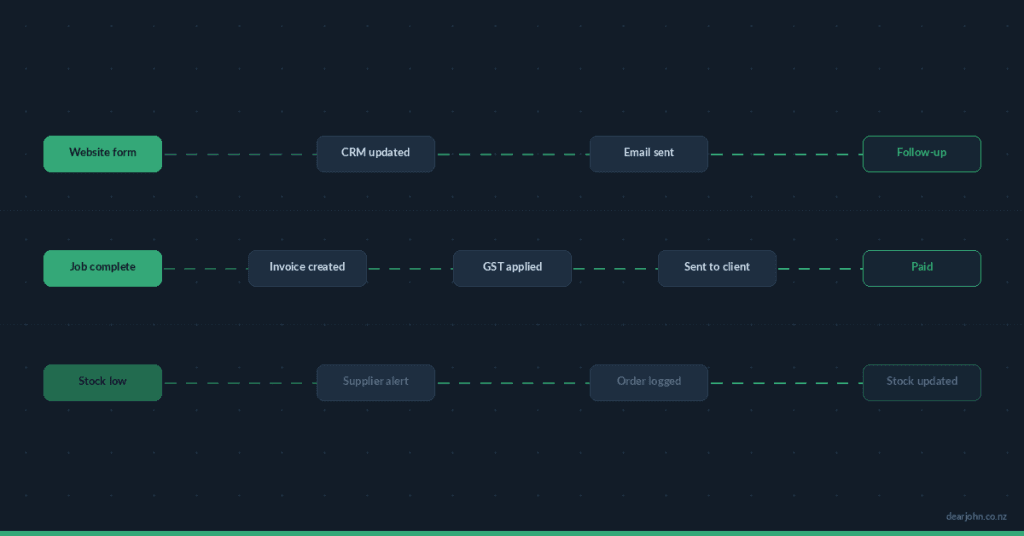
Workflow automation is the use of connected software to trigger actions automatically when something happens in your business. A client books an appointment: they receive a confirmation and reminder. A job is marked complete: an invoice is created in Xero and sent to the client. A form is submitted on your website: a lead is added to your CRM and a follow-up email goes out.
The trigger is a business event. The action is what would otherwise require a human to stop what they’re doing and do it manually.
Most workflow automations run in near real-time. They don’t require checking in, chasing, or remembering. They just happen. You set them up once and pointed them at the right tools.
What Workflow Automation Is Not
It’s not a replacement for judgment. Exceptions, edge cases, and anything that genuinely requires a human decision: those stay with you.
It’s not complicated. Most small business automations don’t require custom code. They connect tools you already use via platforms like Zapier, Make.com, or native integrations baked into the software.
And it’s not something only big businesses do. If you’re running any kind of business in NZ with more than two online tools, there’s almost certainly a process you’re doing by hand that doesn’t need you.
Eight Workflow Automation Examples for NZ Businesses
1. Lead Follow-Up After a Website Form Submission
The manual version: Someone fills in your contact form. You get an email notification. You remember to reply. Eventually.
The automated version: The moment a form is submitted on your WordPress site, the lead’s details are added to your CRM, a confirmation email goes out to the enquirer automatically, and you receive a notification with everything you need to respond. If they haven’t heard back in 48 hours, a second email goes out on its own.
NZ tools in play: Gravity Forms, FluentCRM, Zoho CRM, HubSpot
No lead sits in an inbox waiting. No one slips through because you were on a job.
2. Xero Invoice Creation After a Job Is Completed
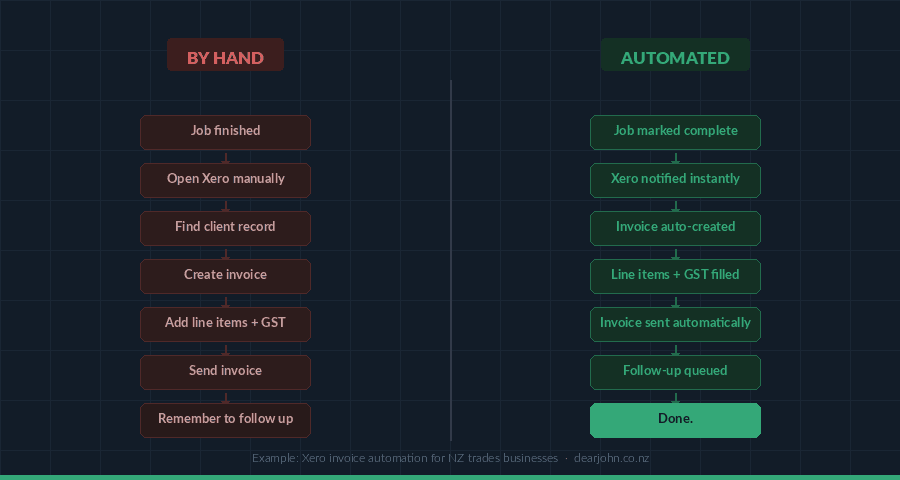
The manual version: Job done. Open Xero. Find the client. Create invoice. Send. Repeat. For every job, every week.
The automated version: When you mark a job as complete in your trades management software, an invoice is automatically created in Xero with the correct line items, the client’s details, and the right GST. It goes out without you touching it.
NZ tools in play: ServiceM8, SimPRO, GeoOp, Fergus (connected to Xero)
Particularly relevant for NZ trades businesses (electricians, plumbers, builders, HVAC) who are completing multiple jobs a day and drowning in admin by Friday afternoon.
3. New Client Onboarding Without the Back-and-Forth
The manual version: Client says yes. You email them a welcome message. Then the contract. Then the intake form. Then you wait for them to send it back. Then you chase.
The automated version: The moment a client pays a deposit or confirms a booking, an automated sequence kicks off. Welcome email. Contract for signature. Intake form link. A follow-up if they haven’t signed after 48 hours. All of it without you being in the loop until they’re actually onboarded.
NZ tools in play: Stripe, Calendly, DocuSign, SignNow, Mailchimp, ActiveCampaign
The client feels looked after. You’re on a job site, not refreshing your inbox.
4. Appointment Reminders That Go Out on Their Own
The manual version: Clients miss appointments. You lose the booking fee, rebook the slot, and have an awkward conversation. Or you manually text everyone the day before, which takes twenty minutes you don’t have.
The automated version: When someone books an appointment, they automatically receive a confirmation. Then a reminder 48 hours before. Then a reminder the morning of. If you need them to fill something in beforehand, that goes out too.
NZ tools in play: Acuity Scheduling, Calendly, Cliniko (popular with NZ health providers)
No-shows drop significantly. You didn’t have to send a single message.
5. Review Requests After a Job Is Done
The manual version: You do a great job. The client is happy. Two weeks later you remember you meant to ask for a Google review. You don’t.
The automated version: When a job is marked complete (or an invoice is paid), a short, personal-feeling email goes out two days later asking for a review, with a direct link to your Google Business profile or other platform. No drafting, no remembering, no awkward ask on the day.
NZ tools in play: ServiceM8, Xero, Gravity Forms, any CRM with email capability
For NZ local businesses, Google reviews are one of the highest-impact things you can collect. The businesses that consistently ask are the businesses that consistently receive them.
6. Staff Rostering and Leave Notifications
The manual version: Someone requests leave. You say yes in a text. You update the roster. You remember to reflect it in payroll. Usually.
The automated version: Staff submit leave requests via a form. Approved or declined with a click. The roster updates. The payroll system is notified. The employee gets a confirmation. One action, everything downstream handled.
NZ tools in play: Deputy, Tanda, PayHero, Xero Payroll
Particularly useful for NZ hospitality, retail, and healthcare businesses managing casual or rotating staff.
7. Low-Stock Alerts for Retail and Product Businesses
The manual version: You discover you’ve run out of something because a customer tried to buy it and couldn’t. Or you manually check stock levels every few days and try to remember what needs ordering.
The automated version: When stock drops below a threshold you set, an alert goes out to you, to your supplier, or to whoever does the ordering. If you’re running a Shopify or Vend store, this can also automatically update availability on your website.
NZ tools in play: Shopify, Vend by Lightspeed, MYOB, Xero, Google Sheets (via Zapier)
No missed sales. No manual stock checks. No supplier emails written from memory.
8. Certificate and Compliance Reminders
The manual version: You track renewal dates in a spreadsheet. Or your head. Occasionally something lapses.
The automated version: Renewal dates are stored in a system (vehicle WOFs, COFs, professional certifications, licence renewals, annual health and safety reviews) and reminders go out automatically at 90, 30, and 7 days before expiry. To you, or to your client, depending on whose responsibility it is.
NZ tools in play: Google Sheets + Zapier, Zoho CRM, ServiceM8, custom integrations
For NZ transport operators, trades contractors, and anyone managing a compliance schedule, this one is straightforward to set up and easy to forget until something expires.
How Do You Know If You’re Ready to Automate?
If the same process happens more than once a week and follows the same steps every time: it’s a candidate.
If you’ve ever said “I keep forgetting to do that” or “someone should have been notified about that”: it’s a candidate.
If you’re copying information from one app into another by hand: it’s a candidate.
The starting point is not the automation itself. It’s mapping what’s actually happening in your business: what triggers what, what depends on what, and where things currently fall through the gaps. Often the real problem surfaces there. Not the tools not talking to each other, but the process itself having gaps that need sorting first.
(Read: How to Figure Out What to Automate in Your Small Business (NZ Guide))
What Makes NZ Businesses Different
NZ businesses tend to run lean. Most are owner-operated or small team. That means the person doing the job is often also the one following up on the invoice, managing the booking system, and chasing the review request.
It’s a systems problem. Fixable without hiring anyone, without a big technical project, and usually without replacing the tools you’re already using.
The tools NZ businesses run on (Xero, ServiceM8, Shopify, Vend, Deputy, Calendly, Google Workspace) connect more readily than most people realise. The work is in mapping the process, choosing the right connection point, and testing before you rely on it.
Where Dear John Comes In
We’re not a software vendor. We don’t push a particular platform or charge ongoing SaaS fees.
What we do is look at how your business actually runs, identify where you’re doing things by hand that should be automatic, and connect the tools you already use so they work together properly. Sometimes that takes an afternoon. Sometimes it takes longer. Usually because the process itself needs sorting before the automation can run cleanly.
We’re based in Paraparaumu on the Kāpiti Coast and work with NZ businesses across the Wellington region and beyond.
If you’re copying data between tools, chasing people for things that should arrive automatically, or running a process from memory that really ought to be documented and automated: that’s exactly the kind of thing we sort.
Tell us what you keep doing by hand.
Get in touch
Frequently Asked Questions
What is workflow automation for small businesses?
Workflow automation for small businesses means using connected software to trigger actions automatically when a business event happens, such as sending an invoice when a job is completed, or sending a reminder when an appointment is approaching. It removes the need for manual, repetitive steps in recurring processes.
What tools do NZ businesses use for automation?
Common automation tools used by NZ businesses include Xero (accounting), ServiceM8 and Fergus (trades management), Shopify and Vend (retail), Deputy (staff rostering), Calendly and Acuity (bookings), and platforms like Zapier or Make.com to connect them. Many NZ businesses already have the tools. The gap is connecting them properly.
How much does workflow automation cost in NZ?
Cost depends on the tools involved and the complexity of the process. Many NZ businesses already pay for software that can be connected without additional cost. Zapier and Make.com have free and low-cost tiers suitable for small business use. The investment is primarily in the setup time and mapping the process correctly before automating it.